

For GMC-registered practitioners, prescribing plays a vital role in patient care and when it works smoothly everyone benefits. ePractice offers a smarter way to prescribe that’s reliable and reassuring for both practitioners and patients. By bringing accuracy, speed and trusted fulfilment together in one seamless flow, it helps you focus on delivering outstanding care with confidence.
Prescribing is powered by Pharmacy2U, the UK’s leading online pharmacy, trusted by millions of patients to deliver meds safely, securely and on time. A trusted pharmacy partner your patients can rely on.
Getting started on your digital prescribing journey
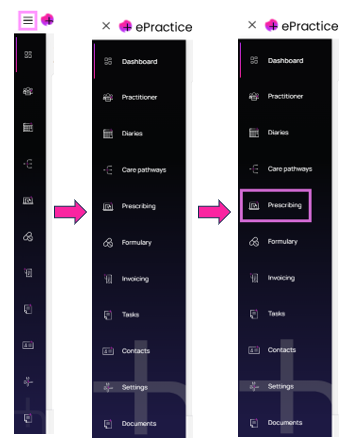
- After logging into ePractice, click the Prescribing icon in the left-hand menu – by default, this menu is collapsed to only show the icons but hovering over each icon gives you tooltips. If you prefer, click on the hamburger menu at the top left of the screen to expand the menu, then click Prescribing
- If you haven’t already, you’ll be presented with a pop-up that asks you to set up your digital signature – just click Add digital signature and follow the steps
- You’ll need to enter your name and contact details, your professional registration (e.g. GMC number) and then verify your ID with a UK driving licence or passport
- Once everything’s been confirmed, you’ll receive a welcome email and you’re now ready to create a prescription
Check out our FAQs below for more info.
Creating a prescription
- Click Create Prescription and search for your patient
- Start typing in the search box to look up the medication on the system – you can speed things up in future by arranging a personalised formulary
- Click on the medication you want to prescribe, add the dose, frequency, duration and how to take it e.g. with food. The system shows available pack sizes, stock availability and alternatives if needed
- Add any special instructions, then click Create Prescription and Confirm
- Click to sign the prescription and then send it to your patient by email
- An on-screen confirmation will appear showing that the prescription has been successfully sent
- Your patient will get an email from patientzone with a link to view their prescription (they must confirm their date of birth)
- They then click Continue and Deliver My Prescription to use Pharmacy2U’s home delivery service – 96% of orders are dispatched the same day
- Once they’ve entered their details and paid, they’ll receive email confirmation and have the option to create an account to track their order
FAQs
How do I register as a prescriber?
It only takes a few minutes as the system guides you through the three simple steps:
- Pop in your details — name, home address, email and phone number
- Add your registration info, like your GMC number
- Verify your ID using your credentials, such as a UK driving licence or passport. The system uses facial recognition to approve your digital signature — super quick and secure
That’s it, you’re all set to start prescribing digitally.
Everything’s encrypted and complies with industry standards, so it’s both secure and fully compliant. If you run into any issues, just get in touch — we’re happy to help.
What credentials do I need to register?
You’ll just need your GMC registration number and a government-issued ID like your UK driving licence or passport. We’re always happy to lend a hand if you need it.
Can I hand a prescription directly to the patient?
Yes, you can print it off instead of sending it electronically – just click Download after you’ve signed it. The patient can then take it to any pharmacy and pay there, just like the old days.
Can I search for and prescribe branded meds?
You bet – just search and select the brand you need. It’s quick, easy and gives you and your patients more choice.
Will the system let me know if meds are out of stock?
Yes, if the pack you’ve chosen isn’t available no worries – it won’t let you confirm the prescription and will instantly suggest an alternative. That way, you can keep things running smoothly without any hassle.
Can I create a go-to list of my favourite, most used meds?
Yes you can. It’s easy to set up your personalised practice formulary based on your prescribing preferences, speeding things up and giving you what you need at your fingertips. Just click the Formulary icon from the left-hand menu and follow the steps. You can also choose whether to search across all meds or just those in your formulary.
Can I edit or change a signed prescription?
It’s all about keeping things safe and compliant but there is some wiggle room to make changes or cancel it if the pharmacy hasn’t processed it yet. Once it’s been dispensed, it’s locked in and you’ll need to issue a new prescription if anything needs changing.
How do I track prescriptions?
All your prescriptions are displayed in one list so you can see what’s been prescribed, check the status (filtering by this, if you want) and review everything easily. These are the status options:
- Relating to the prescription
- Proposed
- Signed
- Sent to patient
- Relating to the Pharmacy2U order
- Dispensed
- Ordered
- Payment pending
- Payment failed
- Payment successful
- Owing
- Despatched
- Cancelled
Are there prescription tracking updates for patients?
Yes. Patients receive tracking update emails, keeping them informed every step of the way. Plus, for added convenience, if they create a patientzone account when they check-out, they can see their tracking in near real-time.
Want to remind patients to reorder their meds?
You can switch on email reminders – just set how many you’d like to send and when. It’s a simple way to help patients stay on track with their treatment and reduce last-minute requests.
How do I resend a previously sent prescription to my patient?
Here’s how you do it:
- Find the prescription in the patient record
- Check the status. If it’s already been dispensed, you’ll need to create a new one
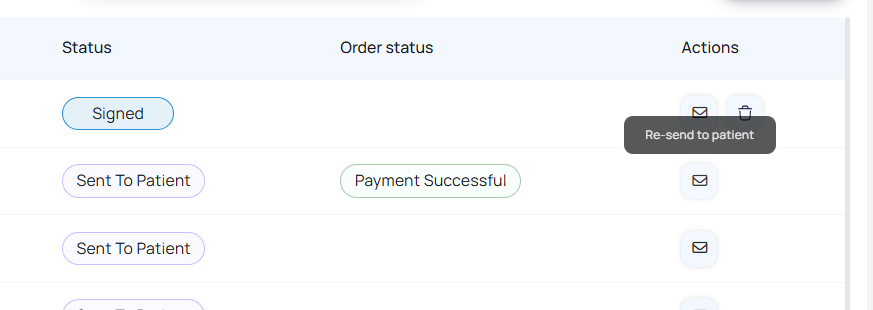
- If it’s not been dispensed you can resend the patient notification by clicking the envelope icon
What about delivery?
We’ve teamed up with Pharmacy2U, the UK’s largest online pharmacy, to offer tracked delivery using Royal Mail. For answers to your questions about delivery and more, visit www.pharmacy2u.co.uk/help-and-support.
Are electronic prescriptions legally compliant?
In the UK, electronic prescriptions are legal under the Human Medicines Regulations 2012. They need to have an advanced electronic signature that confirms who the prescriber is and keeps everything secure. Good news — our system includes that signature as part of the process, so you’re all set on the compliance front without any extra steps.
Is patient data safe?
Absolutely. All patient info is protected with encryption, secure servers and strict access controls. It’s all fully UK GDPR-compliant, so data stays confidential and protected. You can read more about our data security.
If you need more help with Prescribing, why not sign up for a free 1-2-1 Healthcode Academy training session or get in touch with one of our friendly team.